Posts

Showing posts with the label Co-operation

Debugging with MaKey MaKey Plug and Play Activities

Image
Kia ora fellow educators!  Today, I want to share my excitement about a fantastic tool that has been helping me foster digital literacy and problem-solving skills in my Digital Technologies (DVC) class – the MaKey MaKey plug and play resources. These incredible kits have allowed my students to delve into the world of debugging while having loads of fun! Now, you might be wondering, "What's the big deal about debugging?" Well, in the New Zealand Digital Technologies Curriculum, debugging plays a pivotal role. It falls under the Computational Thinking practice, which is one of the key areas of the curriculum. Debugging is all about identifying and fixing errors in code or programs, making it an essential skill for our students to develop. In the fast-evolving digital landscape, the ability to debug empowers our learners to think critically and logically. Debugging fosters resilience, as students learn to approach challenges with a positive mindset and persevere until they f...
Exploring the Educational Benefits of Breakout EDU

Image
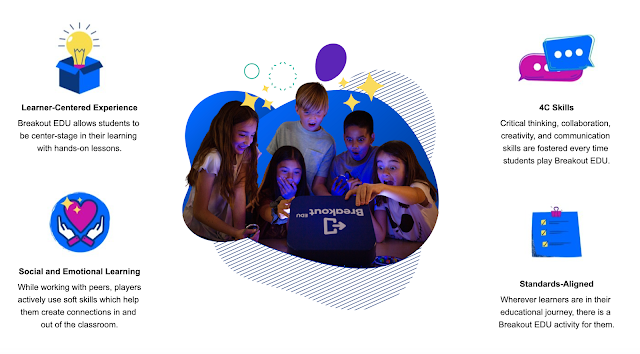
Picture sourced from: breakoutedu.com In the ever-evolving landscape of digital learning platforms, Breakout EDU emerges as a captivating tool that employs games and puzzles to immerse students in the learning process. What sets it apart is its adaptability across various subject areas, seamlessly aligning with the New Zealand Curriculum. Let's delve into the enriching educational experience that Breakout EDU offers: Fostering Critical Skills: Engaging in digital breakouts is akin to embarking on a journey of skill development. Students not only gain subject-specific knowledge but also enhance essential life skills, including: * Problem-solving: In the quest to "breakout" of the game, students must put on their thinking caps, employing critical and creative thinking to decipher puzzles and clues. * Effective Communication: Collaboration is the key to success in Breakout EDU. Students must communicate ideas effectively, sharing insights and solutions to overcome challenges...

Mindful Minute - Digital Tech in an Intermediate School

Image
  In the Mindful Minute Segment, I will share a video (probably from Youtube) that  is themed around digital technologies.  Once viewed, teachers are prompted to ponder the implications of the content for students.   Finally, teachers are urged to consider ONE CHANGE that they can make to their practice that aligns with the thinking in the video, to impact student learning. This week's Prompt: Questions: What kinds of attitudes and competencies does the Principal of Newlands Intermediate state are important in students?  What kinds of attitudes and competencies does the Principal of Newlands Intermediate state are important in teachers?  Feel free to share your thoughts in the comment section below:

Getting the Most Out of Google Docs: 3 Essential Features for Teachers

Image
Hello to all you amazing educators out there! 👋 If you're all about making the most of technology in your teaching journey, Google Docs is like your superhero sidekick. It's not just for tech whizzes – it's a tool that every teacher can use to bring some digital magic into their classrooms. Let's dive into three Google Docs features for busy teachers: 1. Teamwork Made Easy: Real-time Collaboration Picture this: Your students are working together on a group project, each with their own ideas and typing speeds. Instead of chaos, you can have harmony with Google Docs. Start a new document, click the "Share" button at the top right, and invite your students to join in. Everyone can type, edit, and brainstorm in real-time, all in one doc. It's like having a digital whiteboard that never gets cluttered. And don't worry about losing work – Google Docs saves everything automatically. So when your students are busy creating, you can step in to guide and suppor...

Mindful Minute Monday

Image
Kia ora fellow educators and tech enthusiasts! Gather 'round because I've got an epic tale to spin about last week's production madness at our school. Yup, we're diving into the whirlwind of creativity and chaos that was our rendition of High School Musical. So, buckle up, 'cause it's about to get dramatic – in the best way possible! Picture this: a vibrant theatre in town, pulsating with excitement, as we unleashed the magic of High School Musical upon the world. With over 100 talented students in the mix, we were practically bursting with energy. Now, you might be wondering, "What does this have to do with digital tech?" Hang tight, my friend – we're getting there. My mission? Crafting the ultimate set that not only screamed "wild high school vibes" but also served as a playground for our sensational live band. Here's where the tech twist comes in – we got our hands on this two-story structure that screamed "stairwell in a scho...

Mindful Minute # 2

Image
  In the Mindful Minute Segment, I will share a video (probably from Youtube) that  is themed around digital technologies.  Once viewed, teachers are prompted to ponder the implications of the content for students.   Finally, teachers are urged to consider ONE CHANGE that they can make to their practice that aligns with the thinking in the video, to impact student learning. This week's Prompt: Source:  Education Gazette - Tukutuku Korero Questions: What does it mean by students being creators as opposed to users? Are we doing this in our current programmes? What are the soft skills that are mentioned in the clip?   In what ways do we support our students with growing these skills? Is there one thing I could change to support student growth in these areas? Feel free to share your thoughts in the comment section below:

Enhancing Creativity and Critical Thinking with MaKey MaKey in the DVC Classroom

As educators, it is essential to provide students with innovative tools and opportunities to foster their creativity and critical thinking skills. One such tool that has been proven to be highly effective in the realm of Digital and Visual Communication (DVC) is MaKey MaKey. This post will explore the definition of MaKey MaKey, its benefits in the classroom, and how a recent lesson on this tool allowed students to reflect on the functionality of their creations for end-users. MaKey MaKey is an invention kit that allows students to turn everyday objects into touchpads and combine them with the internet. It is a small, user-friendly circuit board with alligator clips that can be connected to various conductive materials, such as fruits, vegetables, aluminium foil, or graphite pencil drawings. By connecting these materials to the MaKey MaKey board, students can create interactive projects, turning their imaginations into reality. Interdisciplinary Learning: MaKey MaKey bridges the gap bet...

Digital Breakouts: A Fun and Engaging Way to Learn

Image
Digital breakouts are a great way to engage students and get them excited about learning. They are a type of escape room that is set up online. Students work together to solve puzzles and find clues in order to "escape" the room. There are many benefits to doing digital breakouts in class. First, they are a lot of fun! Students love the challenge of solving puzzles and working together to achieve a common goal. Second, digital breakouts are very engaging. Students are actively involved in the learning process, and they are not just sitting passively listening to a lecture. Third, digital breakouts can be used to teach a variety of topics. There are digital breakouts available on just about every subject imaginable. If you are looking for a fun and engaging way to teach your students, I highly recommend trying a digital breakout. Here are some tips for getting started: Find a digital breakout that is appropriate for your students' level of difficulty. Give students enoug...